
Transfer Instructions
Germination Transfer Instructions
Disassembly Steps
- Unplug the power and the Wi-Fi cable (if using the LLM function).
- The base of the seed germination box consists of three parts: the table-mounted fixed base (black box), the removable water tank, and the removable retention frame. First, disconnect the USB cables connected to the sensor and the light. Then remove the water tube from the nozzle, as shown in the illustration.
- Water = Orange sprayers inside box- make sure these are pointed away from sensors
- Light = Top round, green plastic piece, plug small black cable in here
- Sensors= Attach white plug into sensor (green square) and insert deep into soil
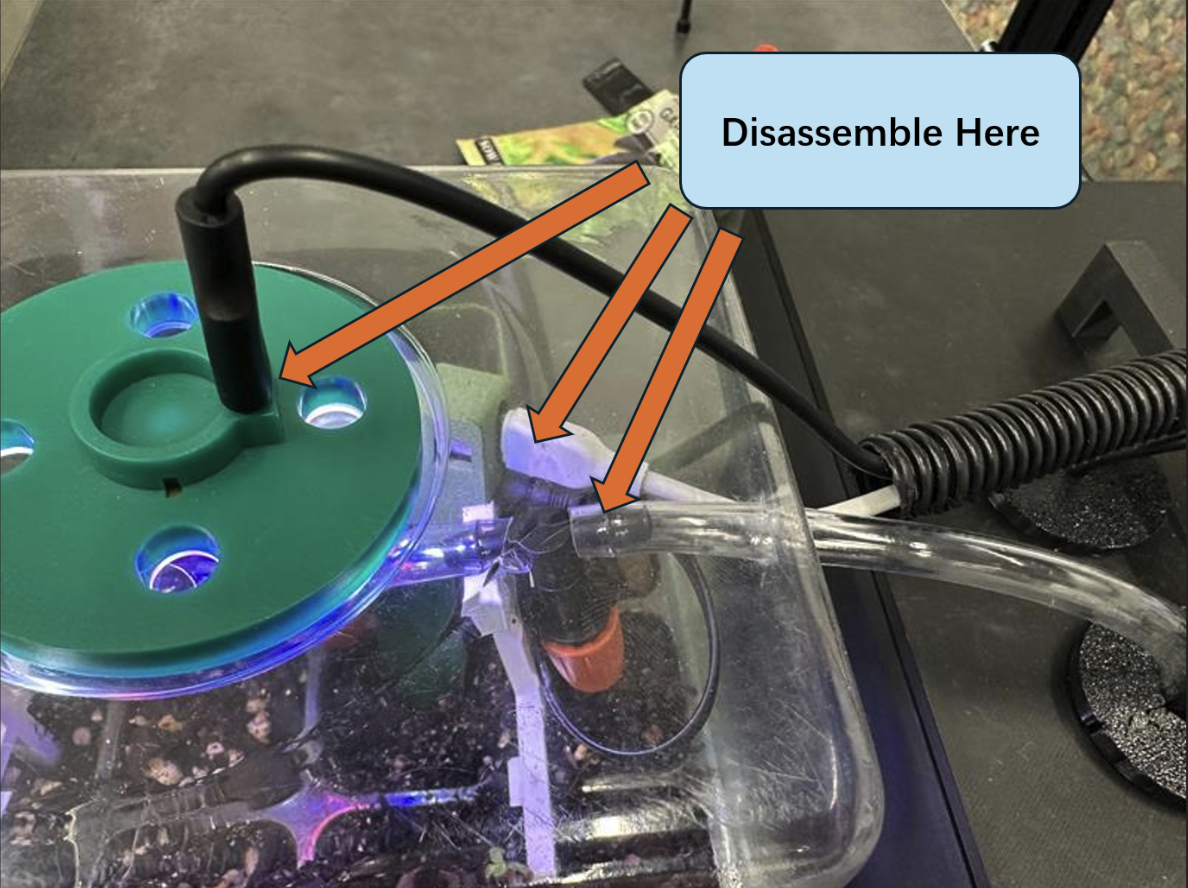
- During transportation, the water tank and the retention frame must be removed to prevent damage. Do not travel with box connected, 3D printed mount is not strong enough to withstand big movement.
- Place the removed components in an appropriate location.
Assembly Steps
- Reinstall the retention frame and the water tank.
- Reconnect the USB cables and the water tube.
- Plug in power and the Wi-Fi cable.
- Wait approximately two minutes for the vignette computer to start automatically. You may see a webpage that appears not fully loaded, this is completely normal.
- The computer boots faster than the software, so you simply need to wait about 10 minutes for the software to launch automatically. After that, refresh the page to see the full interactive interface.
Full Implementation
- Seeds of choice must be added.
- The current LLM function is trained to grow strawberries, jujubes, and green beans.
- New prompts for new seed recognition would need to be added in Open AI for the LLM to work properly.
- Connecting to LLM:
- Prompt > Settings > Devices & Services > Open AI
- The Seed Starter Tray Kit: https://a.co/d/gPuidMr
Last updated 2 days ago
Was this helpful?